


Manga Translator - IsManga
3.19.00 Reviews
App Specs
- Version
- 1.0.101
- Updated On
- License
- Free
- Downloads
- 50,000+
- Developer
- IsManga
- Categories
- Comics
- Platform
- Android, iOS
Screenshots
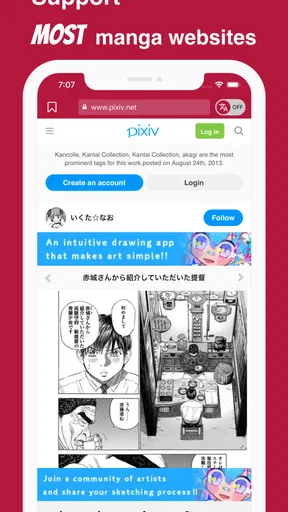

 Analysis by AppCompare
I approach Manga Translator - IsManga as a practical bridge between raw manga pages and readers who do not know the language well enough to follow every line. Its appeal is easy to understand: rather than waiting for an official translation, you can use an AI-assisted browser to work through untranslated material in real time. That can make a discovery session more rewarding, but it also sets a clear expectation: this is a reading aid, not a professional human translator, and the quality of the page still matters.
My first question with a tool like this is not whether it can translate a clean, isolated sentence. It is whether it can help me keep moving through an actual page, where speech bubbles may be small, lettering crowded, and visual context important. That is where Manga Translator is most useful—and where a little patience makes a noticeable difference.
Setting Up the Translator
Getting started with Manga Translator - IsManga is a breeze. You download it, open it up, and you’re greeted with a user-friendly interface. The app is available for both Android and iOS, so no one's left out. After a quick sign-up process, you're all set to explore its features.
The app supports a wide range of languages, which is a huge plus. Whether you're diving into Japanese, Korean, or Chinese manga, IsManga has got you covered. The setup process is straightforward, and before you know it, you’re ready to translate your favorite manga panels.
One practical point is to begin with a single page rather than immediately trying to read a long chapter. A short test lets you see how the text appears on your screen and whether the translation is comfortable to follow. If the source lettering is faint, unusually stylized, or packed tightly into a bubble, that page may take more effort than a clean sample. I would treat that as a useful check of the material, not as a reason to expect every page to behave identically.
The app is free to download, while in-app purchases are listed at $6.99 per item. It is rated for Everyone, and the release date is March 31, 2022. Those details make it easy to try without treating the first session as a commitment, though I would check what an optional purchase covers before paying rather than assume it changes a specific limit or feature.
Using the Translation Feature
The core feature of the app is, of course, its translation capability. You simply snap a picture of the manga text you want to translate, and the app does the rest. The accuracy of the translations is impressive for the most part, though it occasionally struggles with slang and idioms. Still, the app does a commendable job of providing understandable translations.
Worth Reading Before You Choose

Baby Panda World Brings Quick Play to Modern Phones, but Its Game Library Feels Busy

ESPN’s Live Game View Makes Following Close Games Easier

QuizzLand Review: A Good Fit for Short Trivia Breaks, Not Every Player

Basketball Stars: Multiplayer Is Fast, but Can It Recover When Matches Go Wrong?

WEBTOON Turns Phone Updates Into a Better Reading Routine

Link to Windows Runs on Shared Habits, Not Social Feeds
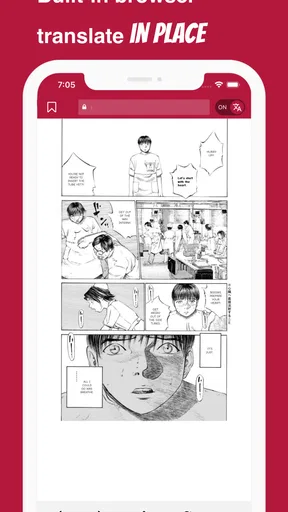
One feature I particularly enjoyed is the ability to adjust the text overlay. You can change the position, size, and even the font of the translated text, which makes reading much more pleasant. This attention to detail is what sets IsManga apart from other translation apps.
For speed, I would think of the experience as a sequence of page-level reading decisions rather than a guarantee of instant, flawless output. A simple panel can be quick to understand; a busy page with several bubbles, sound effects, and decorative lettering naturally asks more of the recognition and translation process. If the result looks confusing, pausing to compare the overlay with the original bubble is often more useful than rushing onward and losing the thread of the scene.
That comparison is also a good way to avoid a common trap: accepting a smooth-sounding line as unquestionably correct. Manga dialogue depends heavily on who is speaking, what happened in the previous panel, and whether a phrase is teasing, sarcastic, or serious. I use the translated text to get the gist, then check the page’s visual cues and surrounding dialogue when a line seems out of character. The app helps me read; it does not remove the need to interpret.
On a day-to-day basis, a sensible workflow is to keep the original page visible while checking the translated version, especially when a panel introduces a new character or plot detail. If one bubble is unclear, focus on that part instead of repeatedly reworking the entire page. This makes it easier to spot whether the issue is a tricky phrase or simply text that the app has had trouble reading.
Additional Features Worth Mentioning
Beyond translations, the app offers some neat extras. There’s a built-in dictionary feature, which allows you to look up words and phrases for better context. This is perfect for those moments when a direct translation doesn’t quite capture the meaning. The app also supports batch translation, so you can translate multiple pages at once. This is a lifesaver when you’re binge-reading a series.
Batch work is most helpful when the pages are consistent in quality and you already know you want to keep reading. For a chapter with varied lettering or a scene full of sound effects, I would still check the output page by page; processing several pages together does not make a difficult sentence easier to interpret. A useful trade-off is to use the batch option to maintain momentum, then return to the dictionary or a single page when a line carries an important clue.
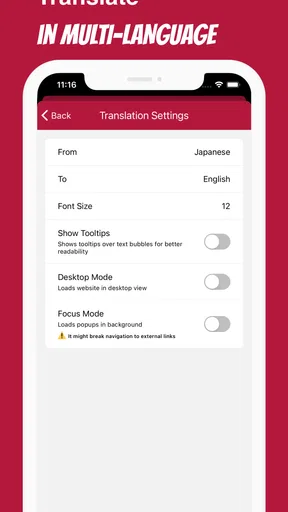
Customizability is another highlight. You can set your preferred language pair, adjust translation speed, and even save your favorite translations for quick access later. These features make IsManga not just a translator, but a comprehensive reading companion.
For language learners, the strongest use is probably selective rather than exhaustive. I would read a page for the story first, then use the dictionary on a word or phrase that appears important or keeps recurring. That keeps a chapter enjoyable while still turning a few moments into active practice. Trying to inspect every line can slow reading to a crawl, and a machine-rendered translation is not a reliable substitute for studying grammar or checking nuanced usage.
Compared with a general-purpose camera translator, a manga-focused workflow has an obvious advantage: the result is intended to sit alongside manga text rather than treat the page as an ordinary sign or document. A camera tool can still be a better fallback when you only need to decode a small isolated phrase or want to compare another rendering. For longer reading, repeatedly switching between a camera app and a page is less convenient; for a single difficult bubble, that extra comparison may be worth it.
Real-Life Scenarios
Let’s talk about how this app fares in real-life situations. Imagine you’ve stumbled upon an untranslated manga that everyone’s raving about. With IsManga, you can snap a quick photo and get a translation on the spot. It’s like having a personal translator in your pocket. This instant access transforms the way you experience manga, especially if you’re keen on exploring the latest series before they hit mainstream markets.
A realistic everyday example is finding a chapter during a commute or a quiet break and wanting to decide whether its premise is worth following. I would translate a page or two, use the story context to judge whether the result makes sense, and save only the phrases I genuinely want to revisit. That is a better fit than expecting to breeze through a whole volume without interruptions. On a crowded train, small text and a bright, detailed page can also make close reading awkward, so this works best when you can give the screen your attention.
Another scenario is when you're learning a new language. The app not only helps you enjoy manga but also serves as a learning tool. You can pair it with language study to boost your vocabulary and comprehension skills. It’s a fun, engaging way to learn.
For readers who already know the source language, the value is different: it can help them check unfamiliar expressions or move through a page without manually looking up every line. For someone who wants exact wording for a translation project, however, I would choose a more deliberate reference workflow. Dialogue can contain wordplay, character voice, and cultural context that a quick translated overlay may flatten.
Heavy use changes the experience mainly because more pages create more chances to meet difficult source text. A long reading session can involve repeated scanning, checking, and correcting your understanding, so I would not assume that batch translation alone removes all friction. If the app seems to bog down on a particular page, try a clearer view or work with fewer pages at a time before deciding the whole session is unusable. That is a practical recovery step, not a promise that every problem will be fixed.
Reliability, Device Fit, and Limits
In reliability terms, I would judge the app by whether it helps me recover from an imperfect result. The dictionary, adjustable overlay, and option to handle pages in batches give me different ways to continue when a first pass is not enough. But no translation tool can make unclear lettering clear in every case, and a clean-looking sentence can still miss the tone. When accuracy matters to the plot, I slow down and cross-check the bubble against the surrounding panels.
The current version is 1.0.93, and the minimum operating-system requirement is 7.0. That makes the stated platform threshold fairly accessible, but compatibility alone does not tell you how comfortably the app will run on every device. On an older or less capable phone, I would keep a session modest and close other demanding tasks if the device feels strained. I would also avoid judging performance from one unusually dense page; the source image itself can make a substantial difference.
Manga Translator is developed by IsManga, has more than 50,000 installs, and holds a 3.1 average from 311 ratings, alongside 9 written reviews. I take that average as a reason to set measured expectations, not as a verdict that settles the question for every reader. The app may suit someone who values immediate access and can tolerate checking a few imperfect lines; a reader who needs polished, publication-ready English on every page is likely to be disappointed.
It is also not the right choice if your main goal is a complete, uninterrupted reading experience with professional localization. Officially translated editions remain the better option for natural dialogue, consistent terminology, and careful handling of jokes. A browser-based translator fills a different gap: it helps you explore raw manga when an official version is not available to you, or when you simply want a quick sense of what is happening.
Final Thoughts
In conclusion, Manga Translator - IsManga is a must-have for any manga lover looking to explore stories beyond the language barrier. It’s intuitive, packed with features, and offers a seamless experience that enhances your manga reading journey.
While it’s not perfect, and occasional hiccups in translation can occur, the overall experience is undeniably positive. If you’re a fan of manga and want to expand your library, give IsManga a try. It’s like opening the door to a whole new world of storytelling.
My recommendation is strongest for curious readers who want to sample untranslated work, language learners who enjoy learning through stories, and fans who are comfortable treating machine translation as a guide. Start with a page you can easily read on your device, use the overlay and dictionary when they help, and keep the original artwork in view when the wording feels odd. If your priority is speed above all else, a short excerpt may be enough; if your priority is literary accuracy, an official translation or a human translator is the better route.
Overall, I see its performance as useful but dependent on the page and the reader’s expectations. It gives me a way into manga that would otherwise be difficult to follow, while still asking me to use judgment when text is dense or a line carries subtle meaning. That balance is the key to enjoying it: use it to make raw manga more approachable, not to replace careful translation or the pleasure of a polished edition.
Pros
- Translates manga instantly with high accuracy.
- Supports multiple languages for diverse audiences.
- Easy-to-use interface for seamless navigation.
- Offline mode available for uninterrupted reading.
- Frequent updates enhance performance and features.
Cons
- Occasional bugs with text alignment.
- Some translations may lose cultural nuances.
- Limited free features; premium upgrade needed.
- Advertisements can be intrusive during use.
- Requires significant storage space on device.
FAQs for Manga Translator - IsManga
What is Manga Translator - IsManga and how does it work?
Manga Translator - IsManga is an innovative app designed to translate manga and comic texts into various languages. It utilizes advanced Optical Character Recognition (OCR) technology to detect and extract text from images, then translates it using a robust language processing tool. This allows users to enjoy manga in their preferred language seamlessly.
Is Manga Translator - IsManga compatible with all manga formats?
The app is compatible with most standard manga formats, including JPEG, PNG, and PDF. However, performance may vary depending on image quality and text clarity. Users are encouraged to use high-resolution images for optimal translation accuracy. Regular updates aim to expand compatibility with other formats.
How accurate are the translations provided by Manga Translator - IsManga?
While Manga Translator - IsManga uses cutting-edge technology for translations, accuracy may vary based on the language pair and complexity of the text. The app is continually improving through updates, but users should expect occasional errors, especially with idiomatic expressions or culturally specific content.
Is there a cost associated with using Manga Translator - IsManga?
Manga Translator - IsManga offers a free version with basic features and limited daily translations. For users requiring more extensive usage, a premium subscription provides unlimited translations, ad-free experience, and priority support. Pricing details are available within the app and on the official website.
What are the privacy implications of using Manga Translator - IsManga?
The app prioritizes user privacy and does not store personal data or uploaded images on its servers. All processing occurs locally on the device, ensuring that your content remains confidential. However, users should review the privacy policy for detailed information on data handling and security measures.


